Testing APIs in Neovim with Kulala
With Kulala, you don't need Postman and you don't need to leave the environment that you love when coding. You can enjoy both.
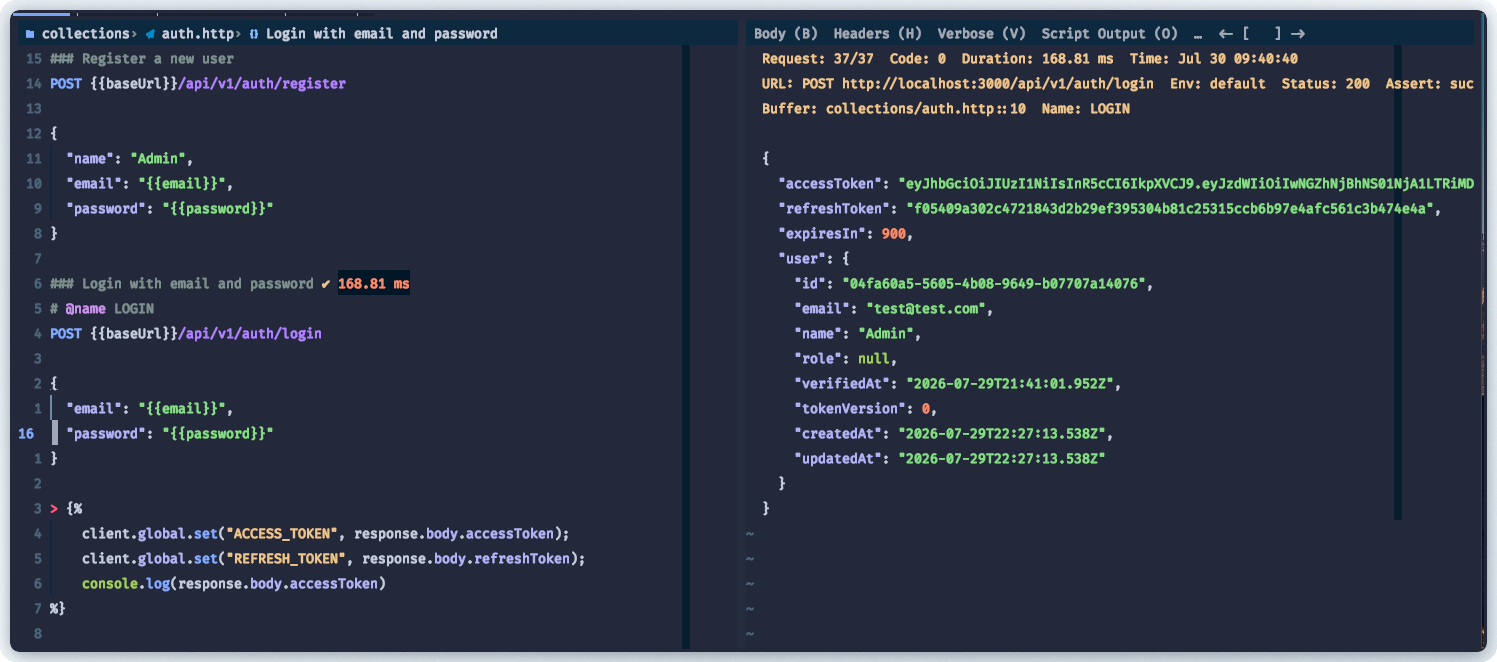
Kulala is a Neovim REST client that speaks the .http file format — the same one VS Code's REST Client uses. One file, one buffer, full control over your API testing without leaving the editor.
Prerequisites
- Kulala.nvim installed in your Neovim config
- A running API to test against
- Basic familiarity with HTTP methods
1. Environment setup
Put shared static variables in http-client.env.json at your project root. This keeps secrets out of your request files and lets you switch between dev/staging/prod.
{
  "default": {
    "baseUrl": "http://localhost:3000",
    "email": "test@test.com"
  },
  "prod": {
    "baseUrl": "https://api.example.com",
    "email": "admin@example.com"
  }
}
Reference them as {{baseUrl}}, {{email}} anywhere in your .http files. Use http-client.private.env.json for secrets (add it to .gitignore).
2. Making requests
Each request should contain a request description that looks like ### Request description before you provide the actual request below in the form METHOD <path..> for example:
GET
This will send a get request to list all products from your baseUrl. Remember that baseUrl is from http-client.env.json-- a static variable shared across all .http files.
### List products
GET {{baseUrl}}/api/v1/products
If you do not have the http-client.env.json you can provide the variable at the top of the request but it will be available only for that request. If you want it for the entire buffer (the http file), add it to the begining of the file.
@baseUrl=http://localhost:3000
### List products
GET {{baseUrl}}/api/v1/product
POST with body
### Create a product
POST {{baseUrl}}/api/v1/products
Content-Type: application/json

{
  "name": "MacBook Pro",
  "price": 2499
}
The body goes after the headers, separated by a blank line. Kulala sends it as-is.
3. Sharing data in the same buffer
Name a request with # @name, then reference its response in subsequent requests:
### Login
# @name LOGIN
POST {{baseUrl}}/api/v1/auth/login
Content-Type: application/json

{
  "email": "{{email}}",
  "password": "testuser"
}

### Get profile (uses token from login above)
GET {{baseUrl}}/api/v1/auth/profile
Authorization: Bearer {{LOGIN.response.body.$.accessToken}}
Add # @kulala-vscode-restclient-compat at the top of the file to enable the response reference syntax. The $.accessToken is a JSONPath expression into the response body.
4. Sharing data globally across files
Response references ({{LOGIN.response...}}) only work within the same file. To share a token across multiple .http files, use client.global.set() in a post-request script. Note that accessToken and refreshToken are results from your login endpoint. So make sure to replace with your own response field.
### Login
# @name LOGIN
POST {{baseUrl}}/api/v1/auth/login
Content-Type: application/json

{
  "email": "{{email}}",
  "password": "testuser"
}

> {%
  client.global.set("ACCESS_TOKEN", JSON.parse(response.body).accessToken)
  client.global.set("REFRESH_TOKEN", JSON.parse(response.body).refreshToken)
%}
Now any .http file in the project can use {{ACCESS_TOKEN}}:
### Get products
GET {{baseUrl}}/api/v1/products
Authorization: Bearer {{ACCESS_TOKEN}}
5. Sharing static data like common headers
Add a $kulalaShared section to http-client.env.json for headers that should go on every request:
{
  "$kulalaShared": {
    "$kulalaDefaultHeaders": {
      "Content-Type": "application/json",
      "Accept": "application/json"
    }
  },
  "default": {
    "baseUrl": "http://localhost:3000"
  }
}
No need to write Content-Type: application/json on every request anymore — it's automatic.
6. Prompting for input per-request
Use # @prompt just below the request description to ask for values at runtime:
### Create a product
# @prompt name Product name
POST {{baseUrl}}/api/v1/products
Content-Type: application/json
Authorization: Bearer {{ACCESS_TOKEN}}

{
  "name": "{{name}}",
}
Kulala pops an input dialog before sending.
7. Directory structure
A typical setup:
project-root/
├── http-client.env.json         # shared env vars + default headers
├── http-client.private.env.json # gitignored secrets
└── collections/
    ├── auth.http                # login + token script
    └── products.http            # uses {{ACCESS_TOKEN}} globally
Key bindings
| Action | Key |
|--------|-----|
| Send request | <leader>R (or :KulalaSend) |
| Re-run last | <leader>r |